.avif)

TL;DR: Klaviyo SMS marketing for Shopify lets you reach customers where they actually read messages, with 95%+ open rates and conversion rates nearly double email. This guide walks through setup, consent collection, the four flows worth adding SMS to first, send frequency rules, and the TCPA compliance details that protect your store from $500+ per-message fines. Build SMS as a second high-intent channel alongside email, not a replacement.
Email is still the workhorse of Shopify revenue, but SMS is the channel customers actually read in real time. SMS flows account for only 7.6% of all SMS sends in Klaviyo yet drive 45.2% of total SMS revenue. The top quartile of ecommerce brands earns $1.46 per SMS sent. For most $500k+ Shopify stores, SMS becomes the second-highest revenue channel within 90 days of a proper setup.
This guide covers Klaviyo SMS marketing from the ground up: how to turn it on, how to collect consent legally, which flows to add SMS to first, what to send, and how to avoid the compliance traps that quietly drain revenue. Every step is specific to Klaviyo and Shopify.
What is Klaviyo SMS marketing and how does it work on Shopify?
Klaviyo SMS marketing is text message marketing built directly into the same platform that handles your email. It uses the same customer profiles, the same flows, and the same segments as email, so an SMS subscriber on Shopify can be added to an abandoned cart sequence, a welcome series, or a campaign without setting up a separate tool.
When a customer enters their phone number at Shopify checkout and opts into SMS marketing, that consent syncs automatically to Klaviyo and adds them to whatever SMS list you have connected. From there, Klaviyo treats the subscriber the same way it treats an email contact, just with text as the delivery channel.
The pricing model is credit-based. A standard US SMS costs one credit, roughly $0.0092 to $0.0120 per message. MMS messages (which include images or GIFs) cost three credits. Messages over 160 characters cost two credits. Credits renew monthly and the free plan includes 150 credits.
How do I set up SMS in Klaviyo for my Shopify store?
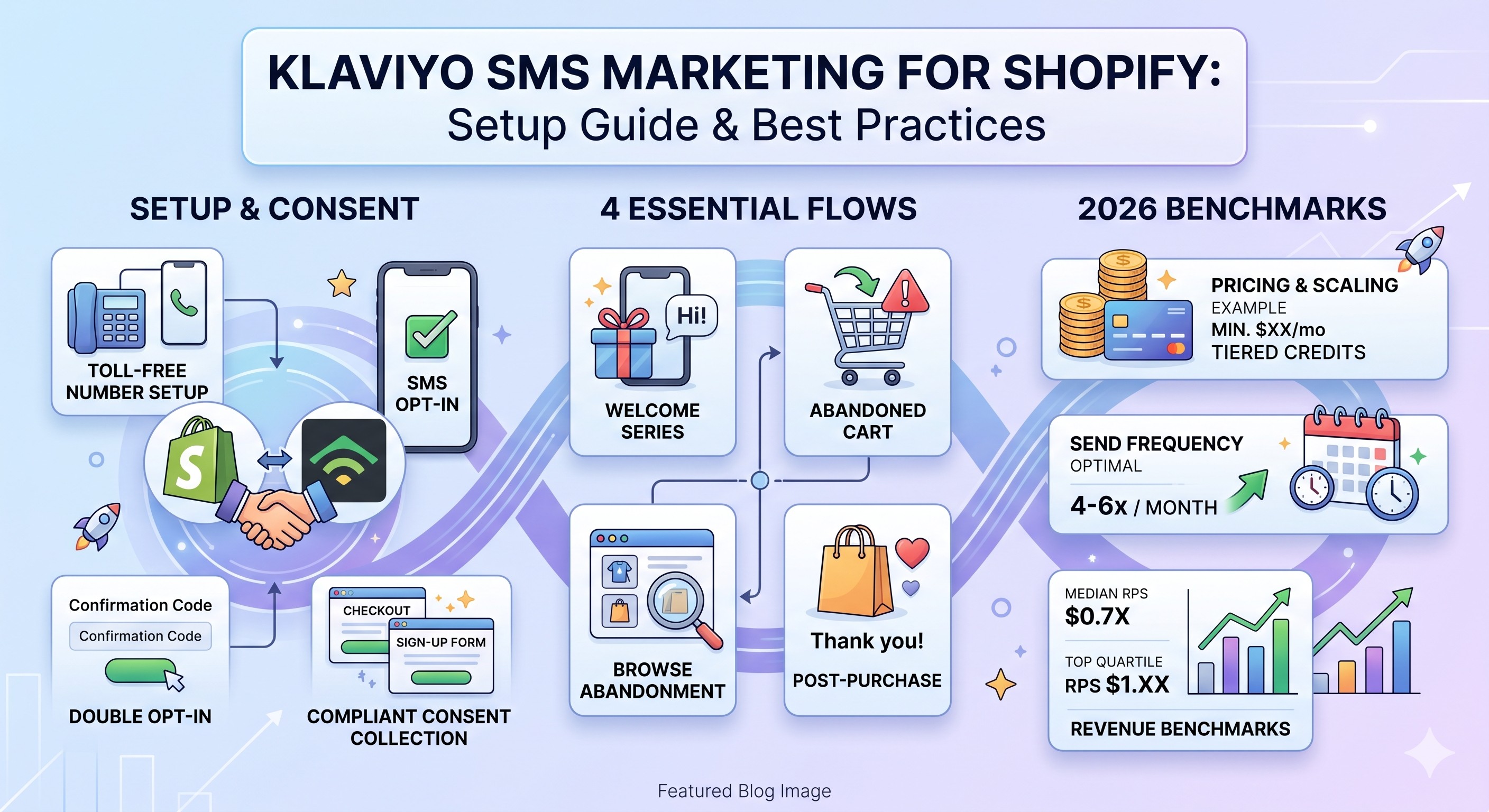
Setting up Klaviyo SMS takes about 30 minutes of active work plus a 2 to 5 business day wait for toll-free verification. First, go to Account, then Settings, then SMS. Klaviyo will ask you to confirm your sending country, then provide business details (legal name, address, EIN, website, opt-in language samples) so it can submit your toll-free number for verification.
While verification is pending, set up your sending number type. For most US Shopify stores, a toll-free number is the right starting point. It costs a few dollars per month versus $1,000+ per month for a short code. Klaviyo does not support 10DLC in the US, so toll-free is effectively the default for stores under enterprise volume.
Next, connect Shopify to sync subscribers. In Klaviyo, go to Integrations, find Shopify, and enable the option to sync SMS subscribers from Shopify checkout to a designated SMS list. Use separate lists for email and SMS, because the consent records and unsubscribe rules are different.
Finally, turn on SMS consent collection in Shopify itself. Inside your Shopify admin, go to Settings, then Checkout, then scroll to Marketing options and toggle on SMS. The checkbox now appears at checkout, and any customer who opts in will flow into Klaviyo automatically.
How do I legally collect SMS consent in 2026?
Legal SMS consent in 2026 requires written, opt-in agreement with clear disclosure, and the rules tightened significantly with the FCC's one-to-one consent rule that took effect in early 2025. Consent obtained for one brand cannot be shared across partners. TCPA violations carry fines of $500 to $1,500 per message sent without proper consent, which means a single bad campaign to 10,000 contacts can theoretically generate millions in penalties.
There are four places to collect SMS consent on a Shopify store, and each one has its own consent language requirements:
The checkout opt-in is the easiest and highest-quality source. Customers entering payment information are already in buyer mode, so SMS lists built from checkout convert better than lists built from popups.
A multi-step popup is the workhorse for new visitor capture. Klaviyo's popup forms support collecting email on step one and phone number on step two, with required disclosure language about message frequency, data rates, and STOP-to-opt-out instructions. Email-first popups convert 3 to 5x better than asking for phone upfront. If popups are leaking traffic on your store, our popups and email capture service is built to fix exactly that.
Embedded forms on landing pages and the footer give you another collection point that does not interrupt browsing. They tend to convert lower than popups but capture a different intent segment.
Keyword-based opt-in (texting JOIN to your number) is useful for in-store, packaging inserts, or paid ad creative.
Every opt-in source needs to log a timestamp, the exact disclosure language shown, and proof of the user's action. Klaviyo handles this automatically when consent is collected through its forms or the Shopify integration.
Which Klaviyo SMS flows should I build first?
Build SMS into your four highest-intent flows first, in this order: abandoned cart, browse abandonment, welcome series, and post-purchase. These are the flows where a text message reaches someone who is already considering buying, so the conversion math works.
Abandoned cart SMS
Abandoned cart is the single highest-ROI place to add SMS. SMS abandoned cart messages recover 15 to 20% of carts compared to 5 to 10% for email, and the channel can generate up to $5.60 per message sent.
The setup inside Klaviyo: open your existing abandoned cart flow, add a Conditional Split after the first time delay, and split on the property "Has consented to SMS marketing equals true." Add an SMS message on the true branch, set to send roughly 4 to 6 hours after the cart abandonment. US guidelines require sending only one SMS per abandoned cart and within 48 hours of the abandonment. Keep the message under 160 characters, show only the first item, and include a direct checkout link.
Browse abandonment SMS
Browse abandonment uses the Viewed Product trigger and catches shoppers who looked at a product page but never added to cart. It is lower volume than abandoned cart but higher specificity. Add SMS as a second message in the flow, 4 to 8 hours after the trigger, segmented to engaged SMS subscribers only. Pair it with our browse abandonment guide for the email-side setup.
Welcome series SMS
Build the SMS welcome series as a separate flow from the email welcome series, because subscribers can opt into email and SMS separately and each welcome flow can only be entered once per subscriber. Trigger the SMS welcome on List Added to your SMS list. Keep it short: a one-message welcome with a discount code works better than a three-message sequence. SMS subscribers signed up for utility, not storytelling.
Post-purchase SMS
After a customer places an order, a short SMS confirming the order is a high-trust touch that builds the channel without selling. The real revenue comes 14 to 30 days later, when a replenishment or upsell SMS goes out to customers who haven't reordered. This pattern works best in consumables, apparel, and supplements.
What should I send in SMS campaigns?
SMS campaigns work for time-sensitive promotions, product launches, restocks, and flash sales. They do not work for newsletters, brand storytelling, or long-form content. Save those for email.
The format that converts: one offer, one CTA, under 160 characters, a clear call to action like "Shop now" with a short link. Lead with the value (the discount, the launch, the deadline) and put the brand name first so subscribers know who is texting them.
Send frequency matters more in SMS than in email. Most ecommerce brands find success sending 2 to 4 SMS campaigns per month, with a hard ceiling of 3 messages in any 24-hour period. Going above 4 per month consistently produces unsubscribe spikes and complaint rates that can put your sending number at risk.
Quiet hours are non-negotiable. Federal TCPA rules prohibit marketing texts between 9 PM and 8 AM local time. Klaviyo enforces this automatically through its quiet hours setting, but a conservative 8 PM to 11 AM window respects both federal and stricter state rules. Always send based on the recipient's local time zone.
Send times for ecommerce SMS cluster around two windows: 12 to 2 PM and 4 to 7 PM. The afternoon window tends to drive higher click rates because subscribers are winding down and able to act on a message immediately.
What SMS performance should I expect?
Realistic SMS benchmarks for Shopify stores in their first 6 months of SMS marketing:
Click rates on flow SMS messages average 10% and top performers exceed 16%. Campaign click rates are roughly half of flow rates. Open rates are near 95% on SMS, but that figure reflects device-level message expansion rather than active reading, since SMS previews show on the lock screen. Treat clicks as the real engagement signal.
Placed order rates from SMS campaigns vary by category: the top 10% of apparel and accessories brands see 0.59%, health and beauty hits 0.77%, and toys and hobbies reaches 0.73%. SMS contributes 10 to 20% of total ecommerce revenue for most DTC brands, with flow-heavy programs at the top of that range.
Across the Shopify stores we manage at CartStrings, the SMS programs that scale to 15%+ of total revenue all share three traits: separate email and SMS welcome flows, SMS in the top three conversion flows from day one, and a campaign cadence that stays under five messages per month. The brands that struggle either over-send into unsubscribes or never add SMS to flows at all.
How does Klaviyo SMS pricing work?
Klaviyo SMS pricing uses a credit system that bundles carrier fees, so there are no surprise costs on top of what you see. In the US, a standard 160-character SMS costs one credit at roughly $0.01 per message. Messages over 160 characters cost two credits. Adding an emoji can push a message into the two- or three-credit range depending on encoding.
MMS messages (with images or GIFs) cost three credits in the US. International rates vary: Canada SMS is 3 credits, UK is 5 credits, Germany is 12 credits. Credits renew monthly on your billing cycle.
The free plan includes 150 SMS credits per month, enough to test a small list. Paid SMS plans scale with credit volume and stack on top of the email pricing tier. A typical $500k Shopify store with 5,000 SMS subscribers and 3 monthly campaigns budgets around $200 to $400 per month for SMS credits.
Where SMS fits in your overall email and SMS strategy
SMS is a complementary channel to email, not a replacement. Email drives 30 to 45% of revenue for high-performing Shopify brands. SMS drives an additional 10 to 20%. Run together, the channels can push total owned-channel revenue past 50% of store revenue.
The split-by-purpose model works best: email handles education, storytelling, segmented campaigns, and long-form retention. SMS handles urgency, time-sensitive triggers, and the top of every high-intent flow. Customers should be able to opt into either or both without redundant messaging. If you have not mapped out where each channel earns its place, our email automations service builds the multi-channel flow architecture from scratch.
Where to go from here
Klaviyo SMS marketing for Shopify is one of the highest-ROI channels available to ecommerce brands in 2026, but only when the setup is clean, the flows are added in the right order, and compliance is handled before the first message goes out. Start with toll-free verification and a checkout opt-in. Add SMS to your abandoned cart flow next. Then expand into browse abandonment, welcome, and post-purchase.
If your store is doing $500k+ and SMS still sits outside your Klaviyo strategy, a free Klaviyo audit will map exactly where SMS fits and what revenue it should be generating against your current email program.
Frequently Asked Questions
Is Klaviyo SMS marketing TCPA compliant out of the box?
Klaviyo handles the technical compliance pieces (quiet hours, opt-out keyword handling, consent timestamps), but TCPA compliance also depends on how you collect consent. You still need clear opt-in disclosure on every signup source, separate opt-ins for email and SMS, and accurate records of when and how each subscriber consented.
How long does it take to start sending SMS in Klaviyo?
The technical setup takes about 30 minutes, but toll-free number verification takes 2 to 5 business days. Plan for a full week before your first send. Submit your business information and opt-in language as early as possible to start the clock.
Do I need a separate SMS list from my email list in Klaviyo?
Yes. Use separate Klaviyo lists for email and SMS subscribers because the consent rules, opt-out commands, and compliance requirements are different. The Shopify integration can automatically sync SMS opt-ins from checkout to your dedicated SMS list.
How often can I send SMS to my Shopify customers?
The sweet spot for most ecommerce SMS programs is 2 to 4 campaign messages per month, plus whatever flows fire automatically. Sending more than 4 campaigns per month often causes unsubscribe and complaint rate spikes that can lead to carrier filtering of your toll-free number.
What is the difference between SMS flows and SMS campaigns in Klaviyo?
SMS flows are automated messages triggered by customer behavior (cart abandonment, signup, purchase). SMS campaigns are one-off broadcasts you send to a segment, like a launch announcement or sale. Flows drive most of the revenue per recipient, while campaigns drive more total volume.