.avif)


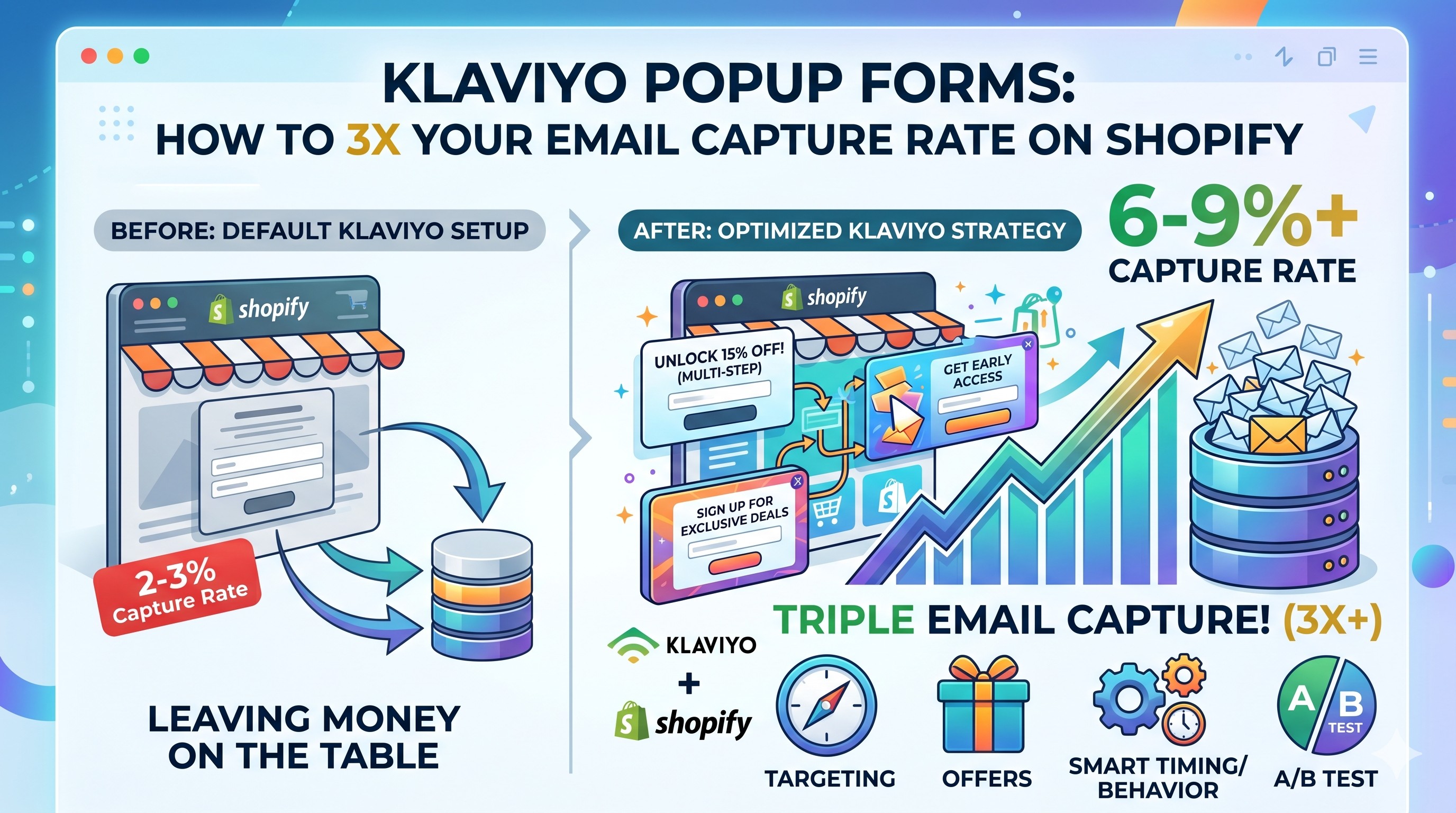
TL;DR: Most Shopify stores run default Klaviyo popup forms that convert at 2-3%, leaving thousands in capture revenue on the table every month. This guide covers the form types, targeting rules, offer structure, and multi-step setup that push Klaviyo popup forms to 8-15% capture rates. You'll learn what to fix today, what to test next, and how to triple email signups without annoying visitors.
If your Klaviyo popup forms are converting at 2 or 3 percent, you're losing list growth every single day. The Shopify brands we work with at CartStrings often see capture rates climb from 2% to 8-15% after we fix three things: form type, offer structure, and step count. None of those changes need a developer, a third-party app, or a redesign.
The problem with default popups is they fire too fast, ask for too much, and offer too little. A visitor lands on your homepage, gets blasted with a generic 10% off popup before they've seen a product, and either ignores it or X's out forever. That single bad popup costs Shopify stores tens of thousands of email subscribers a year.
This guide walks through the exact Klaviyo popup forms setup we use across the Shopify stores we manage. You'll learn which form types convert highest, how to time triggers without being intrusive, what offers move people to subscribe, and how a multi-step form structure can lift capture rates by up to 84%.
What's a good conversion rate for Klaviyo popup forms?
A good Klaviyo popup form converts at 3% or higher, according to Klaviyo's own peer benchmarks. The top 10% of popups across the platform reach 9% or above. If your popup sits below 3%, you're underperforming peers and missing list growth that compounds for years.
Klaviyo classifies popup performance using percentile rankings against peer data from the last 3 months. "Fair" sits between the 25th and 50th percentile, "Good" between the 50th and 75th, and "Excellent" above the 75th. The benchmark icon appears next to popup forms only, since Klaviyo doesn't surface peer data for flyout, full page, or embed forms yet.
External research backs this up. Sumo's analysis of nearly 2 billion popups found the average popup converts at 3.09%, while top performers hit 9.28%. Across the Shopify stores we manage at CartStrings, 8-15% capture rates are common once we move clients past the default Klaviyo template and tighten the offer.
If you've never checked your form's submit rate, open the form in Klaviyo, click the Analytics tab, and look at the submit rate over the last 30 days. Klaviyo calculates submit rate as total submissions divided by total form views.
Which Klaviyo popup form type converts best?
For most Shopify stores, a multi-step popup wins. It captures email on step one and SMS on step two, hitting 5-8% conversion versus 2-3% for single-step popups. Full-page forms convert higher but feel intrusive on cold traffic. Flyouts convert lower but stay friendly. Banners and embeds catch high-intent visitors who already plan to subscribe.
Klaviyo gives you five form types: popup, flyout, full page, embed, and banner. Each one trades attention against friction.
Popups appear in the center of the screen and demand interaction. They convert highest among interruption-style forms but require careful timing. Flyouts slide in from the corner and let visitors keep browsing. Full-page forms take over the entire viewport and produce the highest raw conversion rates, but they raise bounce risk on first-time visitors. Embeds live inside a page section like a footer or sidebar. Banners sit at the top or bottom of the page.
For most Shopify brands doing list growth at scale, a popup or flyout is the workhorse. Add an embed in your footer for visitors who scroll past the popup, and run a full-page form during major launches like Black Friday. Our popup and capture service usually layers all four types so every visitor gets a relevant signup option.
How long should a Klaviyo popup wait before showing?
Set Klaviyo popups to trigger after 5-7 seconds on desktop or 60% scroll depth, whichever fires first. Triggering too fast annoys cold visitors who haven't seen your product yet. Triggering too slow misses people who bounce within 10 seconds. On mobile, scroll depth is more reliable than time delay because of touch behavior.
Klaviyo's targeting engine lets you control display through delay, scroll percentage, and exit intent. According to Klaviyo's targeting and behavior documentation, you can set forms to trigger on any combination of these rules.
Start with these settings on a new popup:
- Time delay: 5-7 seconds
- Scroll trigger: 60% of page
- Exit intent: enabled (desktop only)
- Display frequency: every 5 days per visitor
Exit intent only works on desktop because mobile devices don't track mouse movement. On mobile, Klaviyo's exit popup guidance recommends using scroll-up speed detection or showing the popup on the second page view instead. Keep mobile popups smaller and easier to close, since cramped screens make intrusive forms feel worse.
If your bounce rate spikes after launching a popup, your timing is too aggressive. Push the delay to 10 seconds or change the trigger to scroll only and watch what happens to bounce.
Why multi-step popups convert higher than single-step forms
Multi-step forms split the signup into smaller commitments. Step one asks for the email and offers the discount. Step two asks for the phone number with a small additional perk. Step three confirms with a thank you and the discount code.
Omnisend's 2025 popup analysis of over 1.24 billion popup displays found multi-step popups convert at 2.3% versus 2.0% for single-step. Other research from Optimonk goes further, putting multi-step at 5.64% versus 3.07% for single-step, an 84% lift.
The mechanism is psychological. Once a visitor commits to a small action like clicking "Yes, send me the discount," they're more likely to complete the next step. Behavioral researchers call this the foot-in-the-door effect.
In Klaviyo, any form type can be built as multi-step, and best practice is to collect email and SMS consent on separate steps. The setup is simple: add a step inside the form builder, drag in the SMS field, configure Smart Opt-in to send a one-tap confirmation code, and publish.
Two-step popups also feed naturally into your welcome flow, because Klaviyo can branch your flow based on whether a subscriber gave email only or email plus SMS.
What discount or offer drives the most popup signups?
A 10% off code is the most common Klaviyo popup offer, but 15-20% off, free shipping, or a gift with first purchase typically beats it on conversion. The strongest offers feel exclusive and time-bound. Generic "join our newsletter" forms convert below 1% and should never be your default popup.
Different offers fit different products. For high-AOV brands ($150+ orders), free shipping or a free gift often outperforms a percentage discount. For lower-AOV products, 10-15% off works well because the dollar value is meaningful to the buyer.
Test these offer structures against each other:
- Flat percentage off (10%, 15%, 20%)
- Free shipping on first order
- Free gift with first purchase
- Early access to new products
- Loyalty point bonus for first signup
Klaviyo's gamified spin-to-win forms, launched in 2025, layer interactivity on top of these offers. Spin popups in industry tests pull 8-15% conversion rates because the play element distracts from the friction of typing an email.
Whatever offer you pick, deliver it instantly. Set up an automated welcome flow that fires on list join with the discount code in the first email. If subscribers wait 30 minutes for their code, you've already lost the impulse purchase window.
How CartStrings sets up high-converting Klaviyo popup forms
Across the Shopify stores we manage, our standard popup setup looks like this:
- Form type: multi-step popup, with a flyout for return visitors
- Trigger: 5-second delay or 60% scroll, whichever fires first
- Mobile: 7-second delay, smaller form, larger close button
- Offer: 15% off first order (we A/B test against free shipping for high-AOV stores)
- Step 1: email plus discount offer
- Step 2: SMS opt-in with Smart Opt-in for one-tap consent
- Step 3: thank-you screen with redemption instructions
- Display frequency: 5 days per visitor
We pair the popup with an embed form in the footer for visitors who close the popup and later decide to subscribe. We also run a separate full-page form during major launches like Black Friday or product drops.
The welcome flow then takes over. The first email sends within 5 minutes with the discount code, which is also pre-applied to a one-click cart link. The flow continues for 4-6 emails over 14 days, introducing the brand story, hero products, and reviews. We cover the full structure inside our email automations service.
How to A/B test your Klaviyo popup form
Klaviyo's built-in A/B test feature lets you split traffic between two popup variants and pick a winner based on submit rate. Test one variable at a time: offer, headline, or form type. Run each test until you reach at least 1,000 views per variant, then declare a winner. Smaller sample sizes produce noisy results.
Inside the Klaviyo form builder, click "Add A/B Test" to create a second variant. Klaviyo splits traffic 50/50 by default and reports submit rate, click rate, and revenue per variant. According to Klaviyo's A/B testing guide, tests run continuously until you manually pick a winner.
The fastest wins usually come from these tests:
- Offer (15% off vs free shipping vs free gift)
- Headline framing (discount-first vs benefit-first)
- Form type (popup vs flyout)
- Step structure (one-step vs multi-step)
Avoid testing more than one variable per test. Compound tests get noisy fast, and you won't know which change drove the lift. If your form gets fewer than 5,000 monthly views, give each test a full month before calling it.
Conclusion
The default Klaviyo popup is a starting point, not a strategy. Stores that hit 8-15% capture rates do three things differently: they pick the right form type, time it right, and ask less in exchange for more. Multi-step popups beat single-step. Targeted offers beat generic discounts. Tested timing beats default settings.
If your Klaviyo popup forms have been stuck at 2-3%, fix the offer first, the timing second, and add a multi-step structure third. That sequence captures most of the easy lift.
If you're not sure where to start, a Klaviyo audit reviews your forms, your flows, and the revenue leaks between them. We find what's working, what's leaving money on the table, and what to fix first.
Frequently Asked Questions
How do I add a Klaviyo popup to my Shopify store?
Go to Sign-up Forms in Klaviyo, click Create Form, select Popup, and pick a template. Configure your targeting rules (timing, scroll, exit intent), add an offer and email field, then click Publish. Klaviyo connects directly to Shopify, so no code edits or app installs are required.
What's the difference between a Klaviyo popup and a flyout?
A popup appears in the middle of the screen and requires interaction to dismiss. A flyout slides out from the corner of the page and lets visitors keep browsing. Popups convert higher on cold traffic. Flyouts feel less intrusive on returning visitors and on mobile.
How often should my Klaviyo popup show to the same visitor?
Set the display frequency to once every 5-7 days per visitor at minimum. Showing more often annoys returning visitors who already declined or signed up. Klaviyo respects this setting through cookies, but incognito browsing and cleared cookies will reset the counter.
Should my Klaviyo popup ask for SMS too?
Yes, but on a separate step. Multi-step forms that collect email on step one and SMS on step two convert higher than single-step forms asking for both at once. Use Klaviyo's Smart Opt-in to make SMS consent a one-tap action on mobile.
Why is my Klaviyo popup conversion rate low?
The most common causes are weak offers, popup firing too fast on cold traffic, and asking for too many fields. Test a stronger offer (free gift or 20% off), delay timing to 5-7 seconds, and reduce fields to email only on step one. Most stores see lift within 1-2 weeks.