.avif)


TL;DR: Gmail and Yahoo require bulk senders (5,000+ emails a day) to authenticate with SPF, DKIM, and DMARC, offer one-click unsubscribe, and keep spam complaints under 0.3%. In Klaviyo, a branded sending domain handles SPF, DKIM, and DMARC for you. One-click unsubscribe is already built in. This guide shows you exactly what to turn on and what to skip.
The Klaviyo Gmail and Yahoo sender requirements are the inbox rules that force every Shopify brand sending 5,000+ emails a day to authenticate with SPF, DKIM, and DMARC, add one-click unsubscribe, and hold spam complaints below 0.3% or risk the spam folder. Most store owners hear "new sender requirements" and panic. The good news: Klaviyo does most of the heavy lifting. The catch is the few settings you still have to get right yourself, and the ones that quietly break if you ignore them.
These rules started in February 2024 as a joint Gmail and Yahoo push. They have only gotten stricter since. Microsoft Outlook joined in May 2025, and Google moved from soft delays to hard rejections in November 2025. If your emails are landing in spam or bouncing, this is often why. Here's what actually matters for your Klaviyo account.
Who counts as a bulk sender?
A bulk sender is anyone sending 5,000 or more emails per day to a single inbox provider, like Gmail. Hit that number even once and the full rulebook applies to you. Most growing Shopify brands cross it fast.
Google counts messages per provider, not your total list. So 5,000 emails to Gmail addresses in one day makes you a bulk sender for Gmail, even if your list is split across providers. Yahoo and Microsoft use the same 5,000-a-day line. Across the Shopify stores we manage at CartStrings, almost every brand over $500k a year clears this threshold on campaign send days. If you run sales or big campaigns, assume the rules apply to you.
What do the inboxes require?
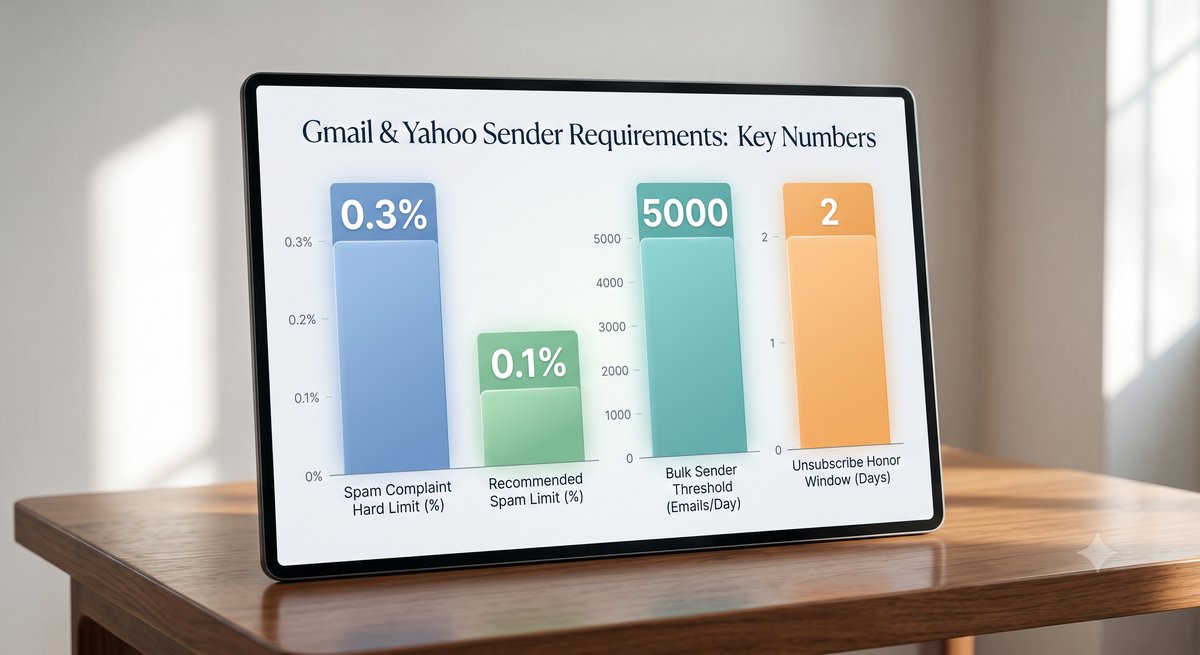
Bulk senders must do five things: authenticate with SPF and DKIM, publish a DMARC record, align their sending domain, offer one-click unsubscribe, and keep spam complaints under 0.3%. Miss any one and your inbox placement drops.
Here is the full checklist in plain terms:
- SPF and DKIM: Both must pass. These prove your emails really come from you.
- DMARC: A policy with at least p=none. It ties SPF and DKIM together.
- Domain alignment: Your "from" address domain must match your sending domain.
- One-click unsubscribe: A working header that lets people leave in one tap, honored within two days.
- Spam rate under 0.3%: That is three complaints per 1,000 emails, measured per provider. Google wants you under 0.1%.
- Valid DNS and TLS: Your sending setup needs proper forward and reverse DNS plus a secure connection.
These rules come straight from Google's sender guidelines, and Yahoo and Microsoft enforce the same standards. The encouraging part for Klaviyo users: most of this is handled when you set up one feature. We cover that next. For a deeper look at the moving parts, our Klaviyo deliverability service breaks down each rule.
How does Klaviyo handle this?
Klaviyo handles most requirements through a branded sending domain. When you connect one, the CNAME and NS records you add automatically enable SPF and DKIM. You can also toggle on a DMARC record during setup. The one-click unsubscribe header is built into every email already.
This is the single most important move. A branded sending domain (like send.yourbrand.com) tells inbox providers the email is truly yours. Without it, you send on Klaviyo's shared domain and inherit other brands' reputations. With it, you control your own.
When you set up the branded domain, Klaviyo's authentication docs walk you through the DNS records to add at your domain host. Those records turn on SPF and DKIM with no extra work. If you flip on the "Add DMARC record" option, Klaviyo generates a compliant p=none DMARC record too. That one toggle covers the requirement that trips up most brands. Setting up clean authentication is the foundation of every account we audit in our Klaviyo audit.
Branded vs shared domain
A branded sending domain uses your own domain and protects your reputation. A shared domain sends from a Klaviyo address and pools reputation with other senders. Bulk senders should always use a branded domain to meet the requirements and control deliverability.
Here's the trap. On a shared domain, you do not need your own DMARC record, because the email is sent from a klaviyomail.com address that already has SPF and DKIM in place. That sounds easy, but it means your inbox placement rides on strangers' behavior. One bad actor on the shared pool can drag your open rates down.
A branded domain fixes this. It isolates your reputation, satisfies the alignment rule, and lets you publish a real DMARC record for your own domain. For any serious Shopify brand, branded is the only choice. This is also where many "Klaviyo emails going to spam" problems start, and where our email automations work pays off, since flows are your highest-volume sends.
Do small senders need this?
If you send fewer than 5,000 emails a day, you are technically not a bulk sender and the strict rules do not apply. But you should still authenticate. Setting up a branded sending domain and DMARC protects you as you grow and improves inbox placement now.
Do not wait until you cross the line. The day you run a flash sale or your list grows, you become a bulk sender with no warning. Brands that set up authentication early never scramble. Klaviyo itself recommends every account, large or small, publish a DMARC policy. Think of it as cheap insurance: a one-time setup that keeps emails out of spam and prevents others from spoofing your domain. If you are not sure where you stand, you can ask for a quick check on a strategy call.
The one-click unsubscribe rule
One-click unsubscribe lets a subscriber leave with a single tap, no landing page or login. Klaviyo includes the required header (the List-Unsubscribe header, built to RFC 8058) in every marketing email automatically, so you are already compliant.
This is the requirement brands worry about most and need to do least about in Klaviyo. The header is baked in. Whether Gmail shows the visible unsubscribe link next to your name is up to Gmail, but the code is always there, so your email still counts as compliant.
Two things still matter. First, keep a clear unsubscribe link in your footer too. The header is a mechanism for the Gmail and Yahoo interface, not a replacement for the classic footer link. Second, honor every request within two days. Klaviyo processes these automatically, so you are covered as long as you do not suppress or re-add people by hand. For more on flows and campaigns that respect this, see our email campaigns approach.
How to keep spam rates low
Keep your spam complaint rate under 0.3%, which is three complaints per 1,000 emails per provider. Google wants you under 0.1%. Monitor it with Google Postmaster Tools, since Gmail does not report complaint data to Klaviyo directly.
This is the rule that bites brands long after authentication is done. You can pass SPF, DKIM, and DMARC perfectly and still get throttled if too many people mark you as spam. The fix is list quality, not tech.
A few habits keep complaints down. Only email people who opted in. Remove subscribers who have not engaged in 90 to 120 days with a sunset flow. Make your unsubscribe link easy to find, because a hidden one pushes people to hit "spam" instead. Set up Google Postmaster Tools so you can actually see your rate, then watch it after every big send. We track this for every client and treat 0.1% as the real ceiling, not 0.3%.
What if you ignore this?
Non-compliant emails get delayed, sent to spam, or rejected outright. Google escalated from temporary delays to permanent rejections in November 2025, and Outlook started routing non-compliant bulk mail to Junk in May 2025. The cost is lost revenue from emails nobody sees.
This is not a warning that might come someday. It is live enforcement across Gmail, Yahoo, and now Microsoft. A brand we reviewed had clean copy and strong offers but no branded domain, so a chunk of campaigns never reached the inbox. The from-address fix and a branded domain recovered placement within weeks. Across the stores we manage at CartStrings, proper authentication is part of why we hold a 99.8% inbox delivery rate. The rules are not optional, but they are very fixable.
Conclusion
The Klaviyo Gmail and Yahoo sender requirements look intimidating until you see how much Klaviyo already does. Set up a branded sending domain, toggle on DMARC, use a from-address on your own domain, and watch your spam rate in Google Postmaster Tools. One-click unsubscribe is handled for you. That is the whole job.
Get these basics right and your emails land in the inbox, where they can actually drive revenue. Get them wrong and even your best campaigns disappear into spam. If you want a second set of eyes on your authentication, deliverability, and flows, book a call with CartStrings. We will tell you exactly what to fix and what is already fine.
Frequently Asked Questions
Does Klaviyo handle Gmail and Yahoo requirements automatically? Mostly. When you set up a branded sending domain, Klaviyo enables SPF and DKIM through your DNS records and can generate a DMARC record with one toggle. The one-click unsubscribe header is included in every marketing email automatically. You still need to use a from-address on your own domain and keep your spam rate low, but the technical setup is largely done for you.
Do I need DMARC if I send under 5,000 emails a day? Technically no, since the strict bulk-sender rules only apply at 5,000 or more emails a day to one provider. But Klaviyo recommends every brand publish a DMARC policy. It improves inbox placement, protects your domain from spoofing, and means you are ready the moment a sale pushes you over the threshold. It is a one-time setup worth doing early.
What is a branded sending domain in Klaviyo? It is a subdomain of your own domain (like send.yourbrand.com) that Klaviyo uses to send your email. It tells inbox providers the mail is genuinely yours, enables SPF and DKIM, supports DMARC alignment, and isolates your sender reputation from other Klaviyo customers. Bulk senders need one to comply and to protect deliverability.
Does one-click unsubscribe replace my footer unsubscribe link? No. The one-click header works inside the Gmail and Yahoo interface, but you still need a visible unsubscribe link in your email footer. Keep both. A footer link that is easy to find actually lowers spam complaints, because frustrated subscribers unsubscribe instead of marking you as spam.
How do I check my spam complaint rate? Use Google Postmaster Tools, which shows your spam rate and domain reputation for Gmail. Gmail does not send complaint data to Klaviyo, so Postmaster Tools is the most reliable source. Keep your rate under 0.3% to stay compliant, and aim for under 0.1%. Check it after every large campaign so you catch problems early.