.avif)

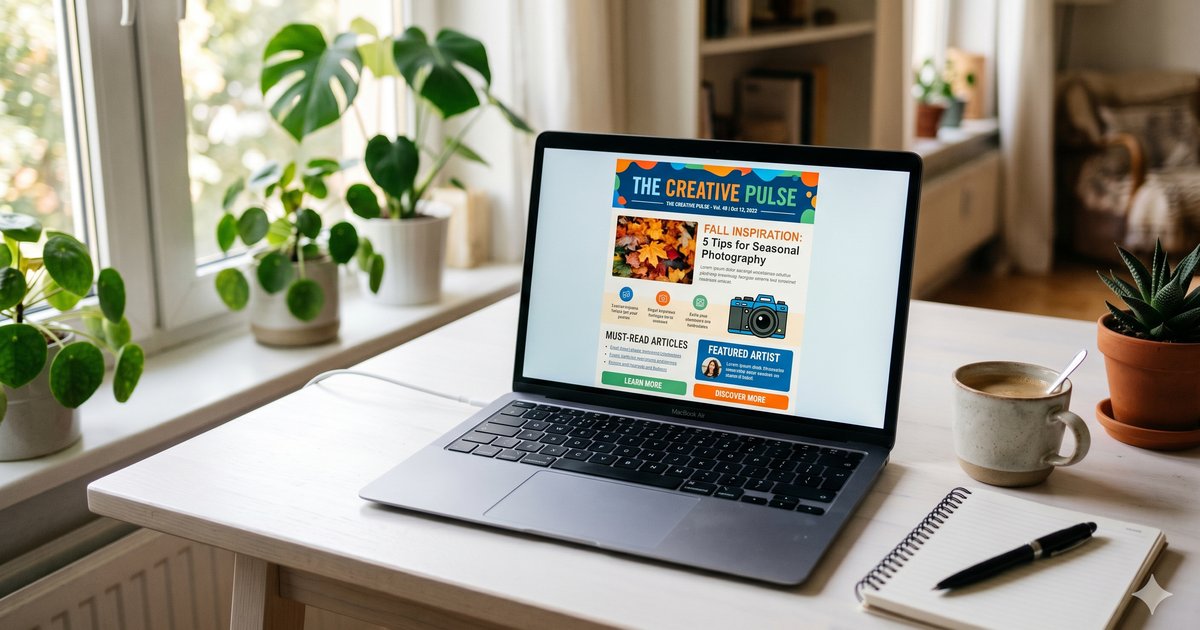
TL;DR: Klaviyo email templates give Shopify brands a fast head start on professional, on-brand emails. The gallery includes around 160 pre-built layouts for welcome series, abandoned cart, newsletters, and more. Start from a template, customize it with the drag-and-drop editor, save reusable blocks, and your design stays consistent across every campaign and flow.
Klaviyo email templates are the fastest way to go from a blank canvas to a sending-ready email. The gallery holds roughly 160 pre-built layouts that cover the full customer lifecycle, so you rarely start from scratch. For a Shopify brand, that means less time fighting with design and more time shipping campaigns that drive revenue. Across the Shopify stores we manage at CartStrings, the brands that move fastest treat templates as a system, not a one-off. They pick a strong base, customize it once, and reuse the parts that work. This guide walks through where to find Klaviyo email templates, how to make them yours, and how to keep them converting.
Where to find templates
In Klaviyo, go to Content, then Templates. You'll see your saved templates plus a Create option to start fresh. The gallery organizes designs three ways: by template type, by layout, and by season or holiday. Template types cover basics, deals, confirmations, outreach, reminders, and sales. Layouts include single-column, split-column, and multi-column formats.
For most ecommerce emails, single-column wins. It reads cleanly on mobile and keeps the reader's eye moving in one direction toward your call to action. Split and multi-column layouts have their place for product grids or category showcases, but they can collapse awkwardly on small screens if you're not careful. The seasonal and holiday section is useful when you're building a quick promo and want a starting point that already feels festive.
A good habit is to browse the gallery by your goal first, not by looks. Ask what the email needs to do, then pick the layout that serves that job. A sale announcement and a shipping confirmation want very different structures, and the gallery is built around those differences.
How many templates?
Klaviyo offers around 160 ready-to-use email templates. They span transactional emails, promotional campaigns, and lifecycle flows. That covers welcome series, abandoned cart, post-purchase, browse abandonment, and more. You almost never need to design a layout from zero. Pick the closest match to your goal, then customize.
The real value isn't the count. It's that each template is already structured for a job. A welcome template leads with a clear offer. A cart template puts the product and a button front and center. A post-purchase template makes room for order details and a next step. Starting from intent saves hours and produces better emails than a blank editor ever will, because the hard structural decisions are already made for you.
This matters most when you're scaling. A brand sending two campaigns a month can hand-build everything. A brand sending eight or ten times a month, plus a full set of flows, needs a repeatable starting point. Templates give you that. They turn email production from a custom project into an assembly line, which is exactly what you want when volume climbs.
The drag-and-drop editor
Klaviyo's drag-and-drop editor lets you swap text, images, buttons, columns, and tables in a few clicks. No HTML or design background required. You drag a block onto the canvas, click to edit, and the email updates live. For most Shopify teams, this is all you need to build polished, on-brand emails without waiting on a designer.
The editor's sidebar holds two things worth knowing. Basic blocks let you build from scratch with text, image, button, and divider elements. Saved or universal content lets you drop in blocks you've already built, like a branded header or footer. Mixing the two is how experienced teams move fast: build the repeatable pieces once, then assemble new emails from them.
If you want pixel-level control, Klaviyo also supports custom HTML templates and a hybrid approach that combines coded sections with editable blocks. But the drag-and-drop editor handles the vast majority of campaigns and flows, and it keeps your team moving without a developer in the loop. Our email automations service builds most flow emails this way, and the speed difference is real.
Customizing a template
Customization is where a generic template becomes your brand. Upload your logo at the right size, around 200 to 400 pixels wide, then set your brand colors using hex codes so every email matches your site. Pick fonts that align with your storefront. Klaviyo supports web-safe fonts and custom font uploads, so you can keep your typography consistent with the rest of your brand.
Hold a clear hierarchy: large headlines, medium body text, small footer text. That structure guides the reader through the email without making them work. Give elements room to breathe, too. White space is not wasted space. Generous padding improves readability and pulls the eye toward your main message and your call-to-action button.
Color and contrast carry more weight than most people think. Your primary button should stand out against everything around it, so a reader scanning on their phone in three seconds still knows exactly where to tap. Resist the urge to add a second or third button competing for attention. One clear action per email almost always outperforms a cluttered layout with five links.
When you finish, save the template so you can reuse and duplicate it later. Building a small set of customized base templates, one per major email type, pays off every week after. For campaign builds specifically, see our email campaigns service.
Are templates mobile-friendly?
Yes. Every Klaviyo template is mobile-responsive by default. The platform adjusts layouts automatically for phones, tablets, and desktops. Still, you should always preview on mobile before you send, since most ecommerce opens happen on a phone and automatic adjustment doesn't catch every layout quirk.
A few mobile habits pay off. Keep your main message and button above the fold, so a reader sees the point before they scroll. Use buttons large enough to tap with a thumb. Avoid tiny text and cramped multi-column rows that collapse awkwardly on small screens. Watch image-heavy designs, which can load slowly or get clipped on mobile clients.
Previewing is quick and worth it every time. Klaviyo lets you toggle between desktop and mobile views inside the editor, and you can send a test to your own inbox to see how real email clients render it. That two-minute check catches problems that would otherwise cost you opens and clicks.
Universal content blocks
Universal content is reusable content you build once and plug into any template. Think of it as a global snippet for your header, footer, or a recurring promo block. When you edit a universal block, every email and flow using it updates automatically. No manual edits across dozens of messages.
This is a quiet superpower for busy teams. Change your footer once and it changes everywhere. Update a seasonal banner in one place and every active email reflects it instantly. You can still use dynamic tags inside universal content, so each send stays personalized to the recipient even though the block is shared.
For a growing brand, universal blocks cut design drift and keep your emails consistent as your library expands. The alternative, editing the same footer across thirty flow emails by hand, is exactly the kind of error-prone busywork that leads to broken links and outdated offers slipping through. Build the shared pieces as universal content from the start and you save yourself the cleanup later.
Why template quality matters
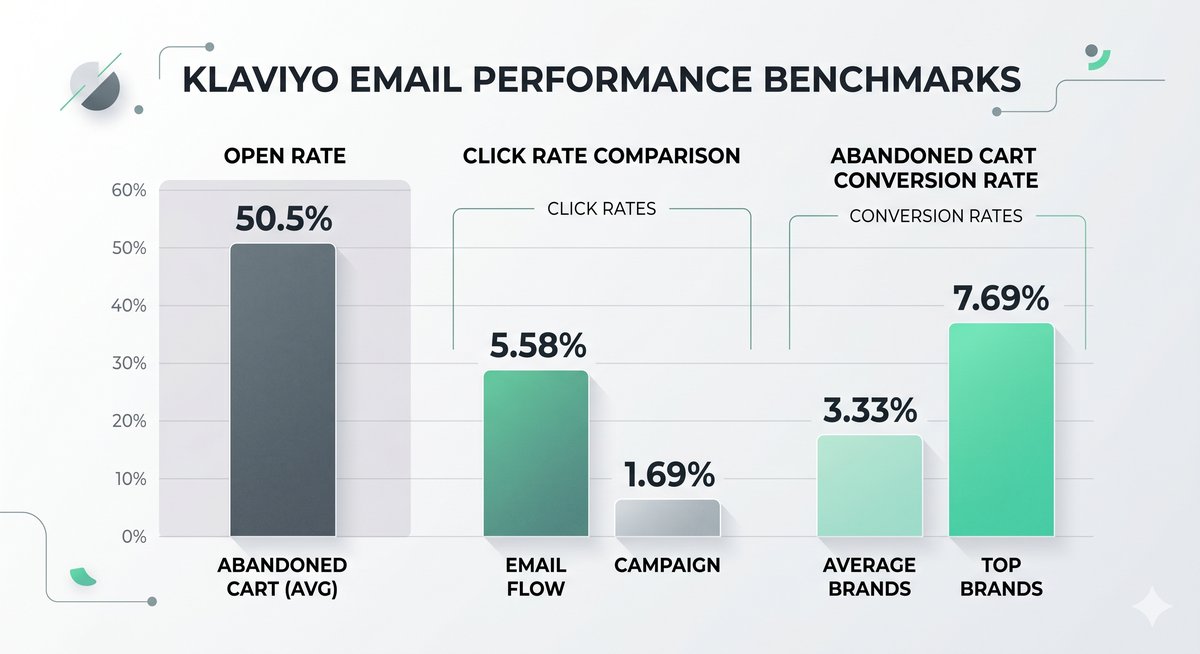
Design isn't decoration. It directly affects revenue. Klaviyo's benchmark data shows email flows deliver roughly 5.58% click rates compared to about 1.69% for campaigns, and flows produce far higher placed-order rates. A clean, focused template with one clear action helps you capture that performance instead of leaking it through a cluttered, confusing layout.
Abandoned cart emails, often built straight from a template, average around a 50.5% open rate per Klaviyo's data, with a conversion rate near 3.33% and top brands reaching close to 7.69%. The template you choose and how you customize it shape whether you land near the average or near the top. The difference between those two numbers is real money for a store doing meaningful volume.
Across the Shopify stores we manage at CartStrings, tightening template design and structure is one of the first levers we pull. Often the emails are already going out, but the layout buries the offer, the button blends in, or the mobile view is broken. Fixing those basics lifts performance without sending a single extra email. If your account needs a closer look, start with a Klaviyo audit, and if deliverability is also a concern, our deliverability service covers the technical side.
Conclusion
Klaviyo email templates remove the hardest part of email: the blank page. Use the gallery to start from a layout built for your goal, customize it once with your logo, colors, and fonts, and lean on universal content to keep everything consistent. Preview on mobile, keep one clear call to action, and save the templates that perform so your team can move faster next time. Treat templates as a repeatable system rather than a series of one-off projects, and your emails get better and more consistent as you scale. If you want a partner to build and manage that system for your Shopify store, book a call with our team, or browse more guides in our articles library.
Frequently Asked Questions
Are templates free?
Yes. Klaviyo's gallery of pre-built templates is included with your account at no extra cost. You can use, customize, and save any of them. Some third-party designers and agencies also sell premium template packs, but you don't need those to build strong, on-brand emails inside Klaviyo.
How many templates?
Klaviyo offers around 160 ready-to-use email templates. They cover the full customer lifecycle, including welcome series, abandoned cart, post-purchase, and promotional campaigns. You can also create your own from scratch or save customized versions for reuse across campaigns and flows.
Can I edit without code?
Yes. Klaviyo's drag-and-drop editor lets you customize templates with no HTML or design skills. You drag blocks, swap text and images, and adjust colors and fonts visually. Klaviyo also supports custom HTML and a hybrid editor if you want deeper, pixel-level control.
Are templates responsive?
Yes. All Klaviyo templates are mobile-friendly by default and adjust automatically across phones, tablets, and desktops. Because most ecommerce emails are opened on mobile, always preview the mobile version and keep your main message and button near the top before you send.
What is universal content?
Universal content is a reusable block you build once and add to any template, such as a header, footer, or promo section. When you edit it, every email and flow using that block updates automatically. You can still include dynamic tags so each send stays personalized to the recipient.